01 / TEST
Vulkanizer AutoGuma
Termini TEST
 Open demo business
Clients choose a time on your website or open your Termini profile with your business QR code. Your TerminiAdmin calendar brings online bookings and appointments taken by phone together.
30-day free trial →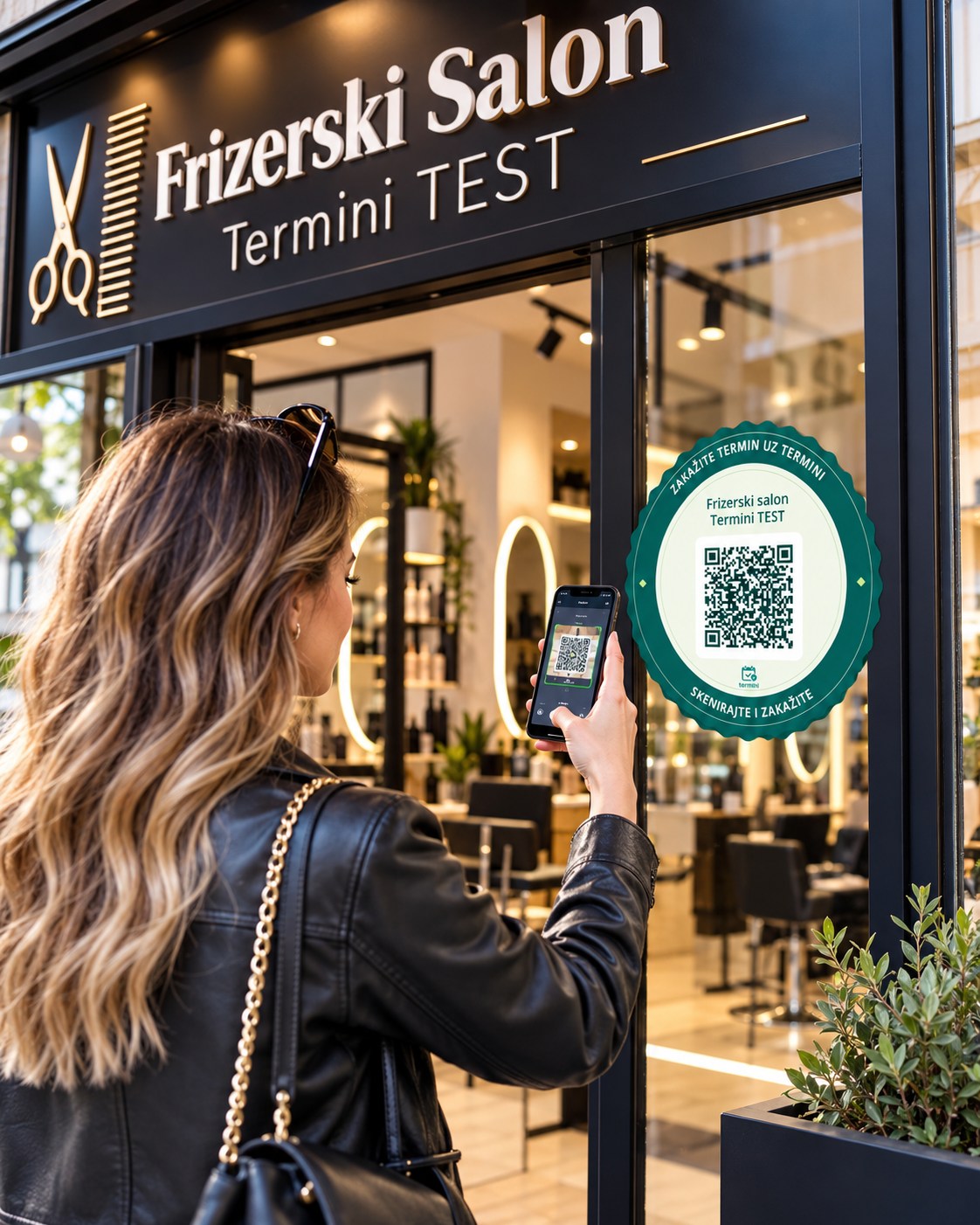
Follow a booking from setup to your calendar.
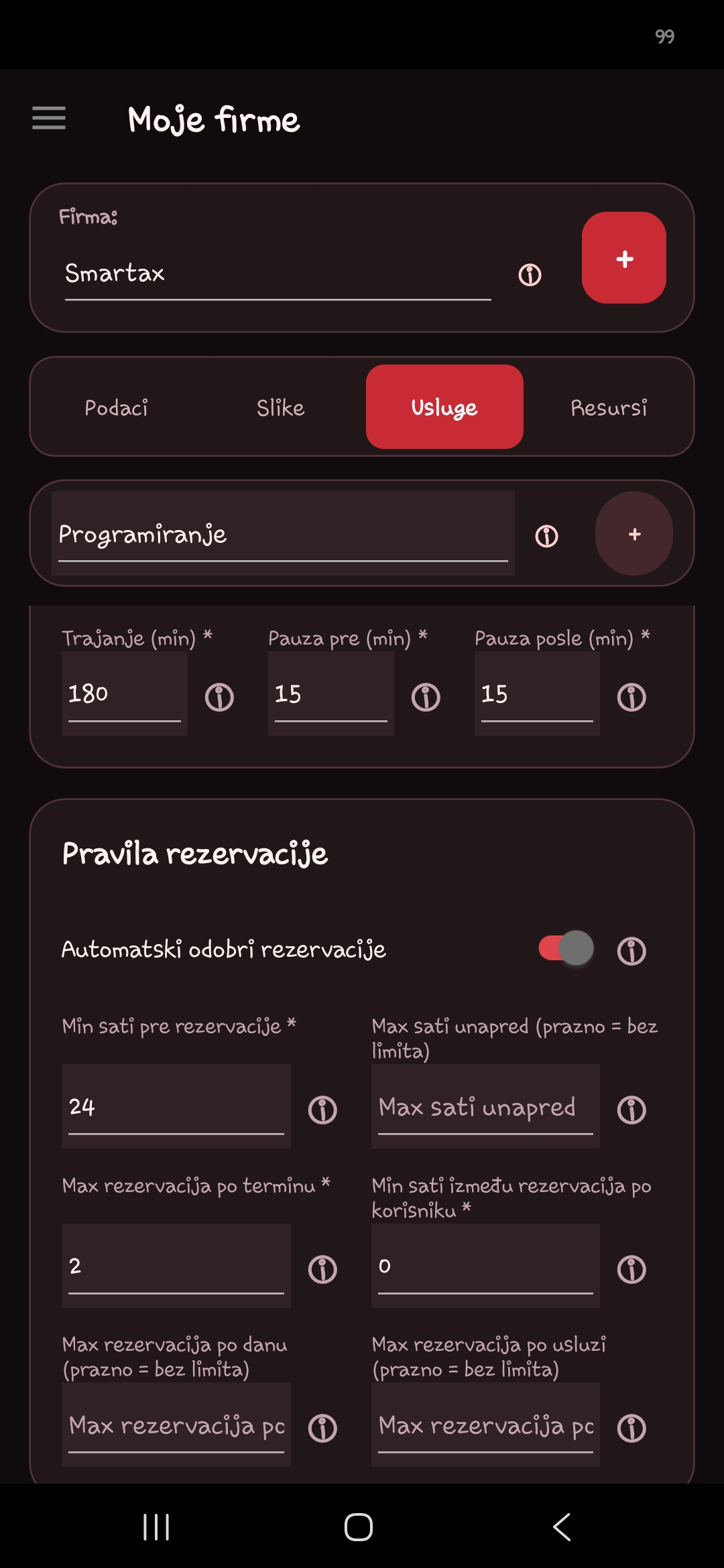
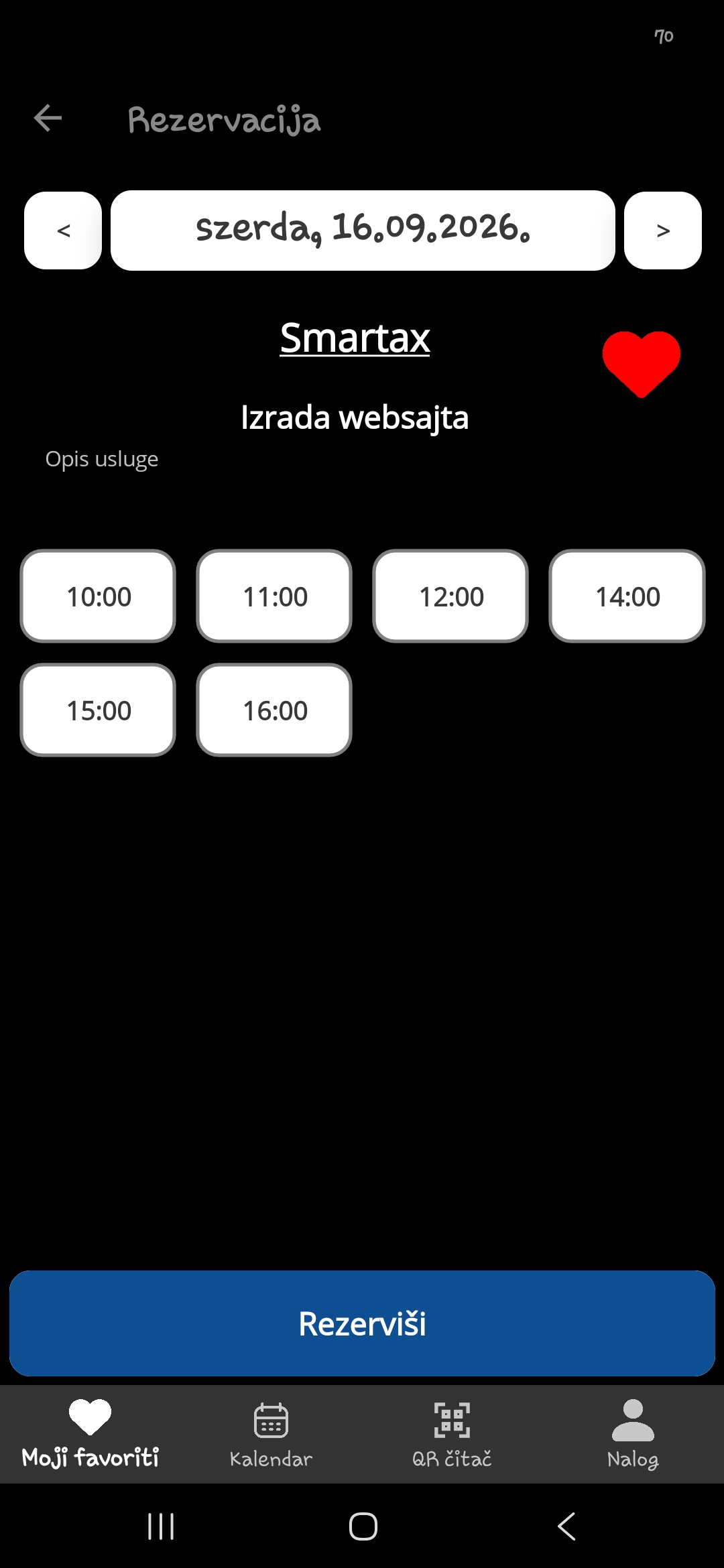
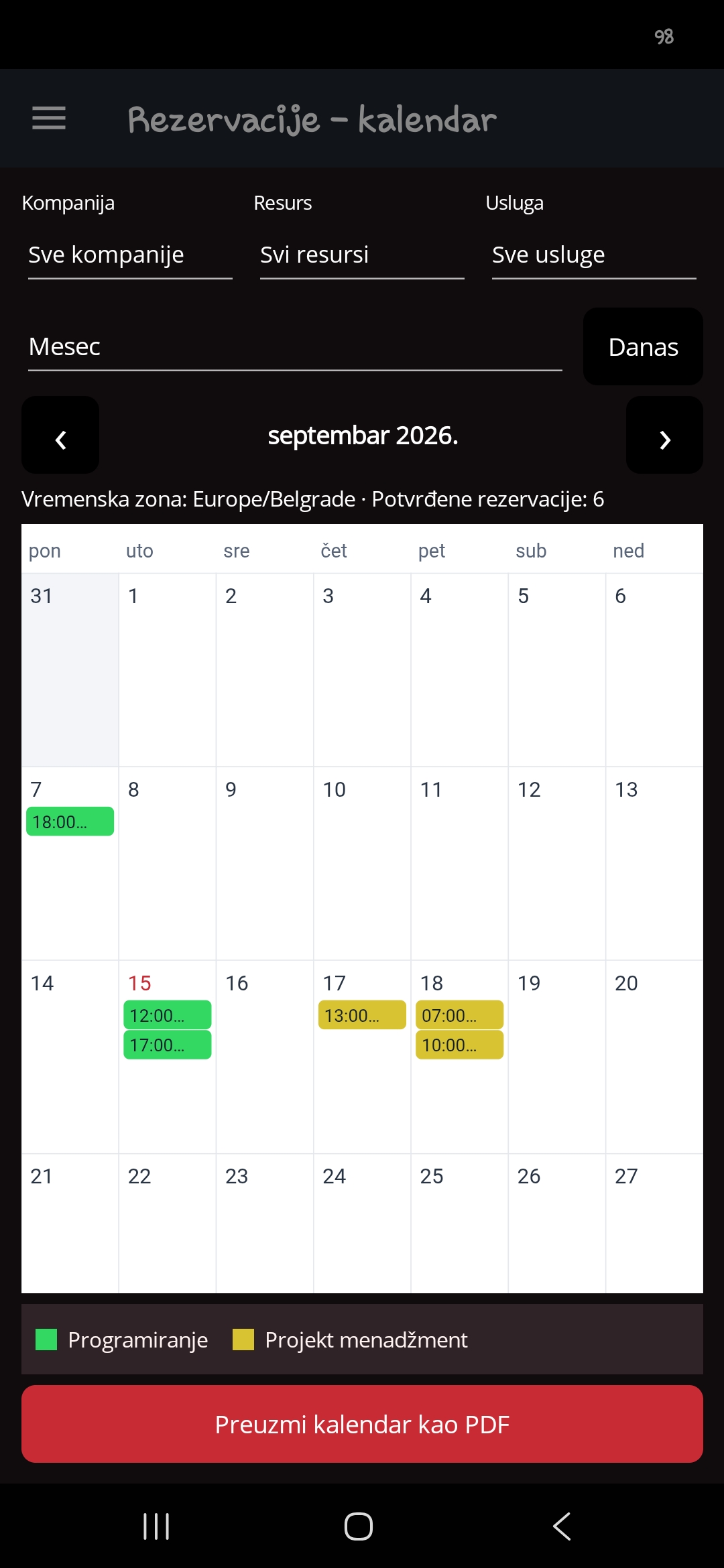
Choose one of five demo businesses and scan its QR code with your phone. On mobile, tapping the QR code does the same thing as scanning it.
Open demo business
 Open demo business
 Open demo business
 Open demo business
 Open demo business
Leave 15 minutes between treatments. Clients only see times that allow for the break.
Take two cars in the same hour by setting up each service bay as a separate resource.
Link a sauna and hot tub that share a room. A sauna booking reserves the hot tub for the same period.
Set up locations and services, including descriptions, prices and duration. Control availability, follow upcoming bookings and view your calendar by day, week or month.
Offer different services at each location. Assign staff to the services they provide, manage access and block time off for one person or the whole business.
Require approval, set group capacity, daily limits and minimum notice. Add required booking fields, such as the wheel size for a tyre change.
Book an open slot for a caller, choose notifications by service and export a PDF schedule for each team member. See which services attract the most bookings.
When your business subscribes to the service, it receives its own AI phone number. The assistant answers customer calls on that number, finds available times, creates bookings and helps change or cancel existing appointments.
The AI phone number assigned to your business is displayed in TerminiAdmin. Customers can call it directly and the AI assistant will answer. If you already have an established business number, you can forward calls from it to this AI number. In TerminiAdmin, choose a model and greeting language, save your own verified OpenAI API key and enable the module. In addition to the monthly fee, OpenAI usage and optional call forwarding may incur charges.
Let customers book directly on your website. A short snippet adds the Termini booking window to any website, with the services you choose.
Web and mobile bookings share the same available appointments. Manage every booking in one place, on your phone, in the TerminiAdmin app.
Insert this short snippet at the bottom of your page, before the closing </body> tag. Replace YOUR_TERMINI_API_KEY with your own API key created in the TerminiAdmin app.
<script>
(() => {
  const script = document.createElement('script');
  script.src = 'https://terminiapp.rs/integrations/embed.js';
  script.dataset.apiKey = 'YOUR_TERMINI_API_KEY';
  document.head.appendChild(script);
})();
</script>Insert this marker wherever you want the booking window to appear. Customers can book any service you have linked to the API key in the app.
<div data-termini-booking></div>Replace the data-termini-serviceid value with the service ID you want to offer. Find it in TerminiAdmin among the services linked to the API key. Only IDs of services linked to that key can be used.
<button type="button" data-termini-serviceid="123">Book an appointment</button>Try the booking window below. Your clients can choose a service and an available appointment right on your website.
Your business rules shape every booking. Expand a topic to see how each feature works and where it can help in day-to-day service delivery.
Termini is the customer booking app. TerminiAdmin is the service provider’s management app. You manage services and bookings centrally while customers choose an available time that suits them. The system supports 13 languages.
Set your business name, logo and introduction on your Termini profile. Present services with pictures and descriptions. Add an email address, phone number and map location so customers can contact you and plan their route.
TerminiAdmin creates a unique QR code for your business. Share it from the app or download a PDF for your entrance, counter or website. Scanning it opens your services. If the app needs to be installed, the customer is directed to the installation page first.
Customers can save frequently used services as favourites. They can then return to them directly in Termini and book again without rescanning the QR code. Booking inside the app requires free registration.
Give each service its own description, pictures, price and duration. Customers can understand the offer before booking, and the system can account for the time the service requires when calculating available slots.
Add any number of fields of different types to each service’s booking form. Fields can be required. A tyre service could ask for the wheel size, while a consultant could ask what the customer wants to discuss, helping staff prepare for the appointment.
Attach a video-call URL to an online consultation, webinar or other remote service. The customer receives the joining link with the booking, saving you from sending it separately to each participant.
Manage several businesses and locations with the same user account. Each location can offer different services, so customers choose from the services available at their selected location.
Set up the people or resources that deliver a service. A consultancy with several advisers or a garage with several service bays can accept bookings in parallel at the same time.
Choose which services each person can provide. Once a staff member has a booking, their occupied time is also accounted for across the other services they provide, helping prevent overlapping appointments.
Give colleagues access to the features they are authorised to use. Share day-to-day scheduling responsibilities across the team and tailor access to each person’s role.
Set availability and a date range in which a service can be booked. Record a staff member’s leave individually, or block bookings for the whole business during a shared holiday or closure.
Allow preparation and recovery time around each service. A massage therapist might need a 15-minute break afterwards or a few minutes to prepare beforehand. The system includes these buffers when calculating available appointments.
Link services that share a room or capacity. In a private wellness space, booking the sauna can block the hot tub for the same period when both occupy the same private area.
Require provider approval for bookings. You can also set a deadline after which an unapproved booking is automatically rejected, giving the customer an outcome for a request that remained pending.
Specify how far in advance a service must be booked. This leaves time for preparation, travel or organisation and controls last-minute bookings.
Choose how many bookings can be made for the same time, the maximum number per day and the total number accepted for a service. These controls suit group training, one-off events and programmes with limited capacity.
Set the minimum time that must pass between two bookings by the same customer. When demand is high, this can help more customers get access to available sessions.
When a customer calls or visits in person, choose from the available times in TerminiAdmin and enter their booking. The system accounts for the occupied capacity when offering appointments online.
View bookings by day, week or month and download the schedule as a PDF. You can create a separate document for each staff member containing the bookings relevant to that person.
Registered customers receive in-app notifications when a booking is approved or rejected. They choose how long before an appointment their reminder should arrive in their own app settings. The default is one hour.
New bookings also trigger notifications on the provider’s phone. In TerminiAdmin, notifications can be turned off per service, so you can choose which services you want to follow on your mobile.
Add a booking interface to your website with a short code snippet. Display it within the page or open it from a button for a particular service. Control the services shown from TerminiAdmin. Website bookings arrive in the same system as app bookings.
The web module requires an email address and works without installing the Termini app. Customers receive an email about the booking, followed by updates when it is approved or rejected.
When the email address entered on the website belongs to a registered Termini user, the booking also appears in that customer’s app, where they can access and manage it afterwards.
Track when and how often your business profile is viewed and how many customers have saved each service as a favourite. These figures help you understand which offers attract interest.
See when bookings arrived, how many you received, which services are most popular and how much revenue is associated with each service. Use these figures to help plan your service offer and schedule.
When your business subscribes to the service, it receives its own AI phone number. The assistant answers customer calls on that number, finds available times, creates bookings and helps change or cancel existing appointments. The AI phone number assigned to your business is displayed in TerminiAdmin. Customers can call it directly and the AI assistant will answer. If you already have an established business number, you can forward calls from it to this AI number.
Choose the opening language, and the assistant adapts to the caller’s language during the conversation. Call recording is optional. When enabled, you can listen again later and find the recording attached to the booking created by the AI.
The AI phone number assigned to your business is displayed in TerminiAdmin. Customers can call it directly and the AI assistant will answer. If you already have an established business number, you can forward calls from it to this AI number. In TerminiAdmin, choose a model and greeting language, save your own verified OpenAI API key and enable the module. In addition to the monthly fee, OpenAI usage and optional call forwarding may incur charges.
Customers use Termini to book appointments free of charge. Businesses configure services and manage appointments in TerminiAdmin. Find the current installation options for each app in the download section.
Each new business can use TerminiAdmin free for 30 days. It becomes inactive automatically when the trial ends, and its services can no longer be booked. A subscription starts when you reactivate the business, after the app shows a warning.
0RSD
30-day usage limit
Try for free1 500RSD / month
Choose Business9 990RSD / month
Choose AI assistantTermini is free for clients. Each new business gets 30 days free in TerminiAdmin. It then becomes inactive and its services cannot be booked. A subscription starts when you reactivate the business after reviewing the notice in the app.
Set up your business bookings in TerminiAdmin. Your clients choose appointments in the Termini app.
 For customers
Time for a massage? Termini favorites put frequently used services within easy reach. Wherever you are, choose an available time that suits you and book. An easier return for clients means less coordination for your business.
 For businesses
Termini is free for clients. Each new business gets 30 days free in TerminiAdmin. It then becomes inactive and its services cannot be booked. A subscription starts when you reactivate the business after reviewing the notice in the app.
Clients book with their email address and receive updates by email. Booking in the Termini app requires free registration.
Select an available time in TerminiAdmin and enter the booking. Online clients then see the remaining capacity.
Use Termini to book an appointment. If you run a business and manage services or appointments, use TerminiAdmin.
Yes. Scan a participating business’s QR code in Termini to open its profile and view available services and times.
Yes. You can return to Termini to view and manage your bookings.